Bee: A Whimsical Color Font to Sweeten Your Designs
There’s a certain magic in designs that feel handmade, warm, and full of personality. You see it in a child’s storybook where the letters seem to dance, or on a boutique product label that instantly makes you smile. This kind of visual charm doesn’t happen by accident; it’s often crafted with a font that has a soul of its own. Enter Honey Bee, a creative color typeface that captures the whimsy of a sun-dappled garden and the softness of a bee in flight. It’s more than just a set of characters; it’s an invitation to inject pure delight into your creative projects.
What Exactly is a Color Font?
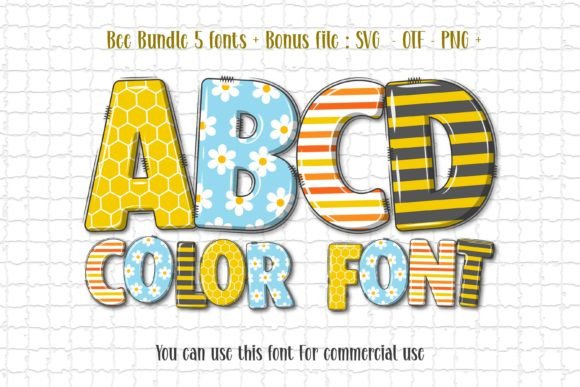
Before we explore the applications, let’s demystify what a “color font” is. Unlike traditional typefaces that are single-color (typically black), a color font like Honey Bee has multiple colors, gradients, and even textures built directly into the file. Think of it as a tiny piece of illustrative art for every letter and number. The Honey Bee typeface, in particular, uses sublime pastel shades that evoke the softness of butterfly wings and the gentle buzz of a summer afternoon. This built-in color means you get a complex, vibrant look right out of the box, saving you time and design steps.
A Font for Stories and Smiles: Practical Applications
The true test of a creative font is where and how you can use it. Honey Bee’s enchanting style makes it a natural fit for projects that aim to connect emotionally and visually.
- Children’s Literature & Education: This is its home turf. Use it for book titles, chapter headings, or decorative elements in activity books and educational posters. It instantly sets a playful, approachable tone that kids and parents love.
- Branding for Boutiques & Creatives: Imagine a logo for a handmade jewelry shop, a children’s clothing line, or a local bakery. Honey Bee helps build a brand identity that feels artisanal, friendly, and full of heart, making your business more memorable.
- Greeting Cards & Invitations: From birthday parties to baby showers, this typeface adds a layer of heartfelt charm that generic fonts can’t match. It’s perfect for headline text on invitations, thank-you cards, or party banners.
- Packaging & Product Labels: For products like honey (naturally!), artisanal jams, organic baby food, or scented candles, Honey Bee can make your packaging design stand out on the shelf, telling a story of sweetness and care before the product is even opened.
- Social Media & Digital Content: In a scroll-stopping world, a unique display font is gold. Use it for Instagram quotes, Pinterest graphics, YouTube thumbnails, or blog post titles to create a cohesive and engaging visual brand that followers will recognize instantly.
- Merchandise & Printables: Think tote bags, stickers, mugs, or printable art for a nursery. The whimsical charm translates beautifully to physical goods, adding a premium, designed feel that customers appreciate.
Pairing Honey Bee with Other Typefaces
A font rarely works alone. The key to professional design is knowing how to pair typefaces to create hierarchy and readability. Honey Bee, as a decorative display font, shines brightest when paired with a simpler companion.
For body text or longer paragraphs, you’ll want a clean, highly legible serif font or sans serif font. A classic sans serif like Open Sans or Lato provides a modern, clean contrast that lets the Honey Bee headlines pop without overwhelming the reader. If your project has a more traditional or literary feel, a simple serif font like Lora or Merriweather can create an elegant, storybook-like combination.
Practical Tip: Always test your font pairings. Set your headline in Honey Bee and your body text in your chosen companion font. View it at different sizes and on various devices to ensure the overall look is harmonious and, most importantly, that the body text remains easy to read.
Important Considerations for Your Workflow
Integrating any new design asset requires a bit of planning. Here are a few practical points to keep in mind with Honey Bee.
- Understand the File Types: Honey Bee comes in OTF and/or TTF formats for the color version. It’s crucial to note that these color font files are not compatible with Cricut Design Space or similar cutting machine software for direct cutting. However, a black version is included that works perfectly with Cricut, Silhouette, and other cutters for projects like vinyl decals or paper crafts.
- Check Your Design Software: The vibrant color version requires specific software that supports advanced OpenType features. Programs like Adobe Photoshop, Adobe Illustrator, Silhouette Studio (Designer Edition or higher), and Inkscape (a free alternative) are your best bet. If you’re unsure, consult the Ultimate Font Guide for detailed instructions.
- Review All Included Styles: A premium font often includes multiple styles or alternates. Take the time to explore the full character set. You might find different swashes, ligatures, or stylistic alternates that can add even more uniqueness to your designs.
- Licensing for Commercial Use: If you plan to use Honey Bee on products you sell—like merchandise, digital templates, or client work—ensure you have the correct commercial license. This protects you legally and supports the font’s creator, allowing for more beautiful assets to be made.
Sparking Joy in Every Design
In a world saturated with minimalist sans serifs and serious serifs, choosing a font like Honey Bee is a deliberate act of whimsy. It’s a tool for designers, entrepreneurs, and creators who understand that visual communication isn’t just about conveying information—it’s about evoking a feeling. Whether you’re crafting a logo for a new small business, designing a social media campaign to boost engagement, or laying out a children’s book that will be read at bedtime, Honey Bee offers a way to weave a tapestry of delight and professionalism. It proves that typography can be both beautiful and functional, helping you build stronger brand recognition and a more joyful connection with your audience. So, go ahead—let your designs take flight.